
Text alerts
Effective November 6, 2026
In short: parents and guardians can choose to get a text when their athlete’s bus leaves, if it’s running late, and when it’s back. It’s optional, about 3 texts per trip, and you can stop any time by replying STOP.
Who sends them
TeamTransit, operated by PJM Designs LLC in Sheridan, Michigan, sends trip alerts on behalf of the school whose team your athlete travels with. Texts come from +1 833-520-1666 and start with the school’s name.
How you sign up
Texts are only sent to people who ask for them. When a school uses TeamTransit, parents and guardians get trip emails with a link to their own trip page. On that page you enter your cell number, tick the box to agree, and press Text me trip alerts. The box is never ticked for you.
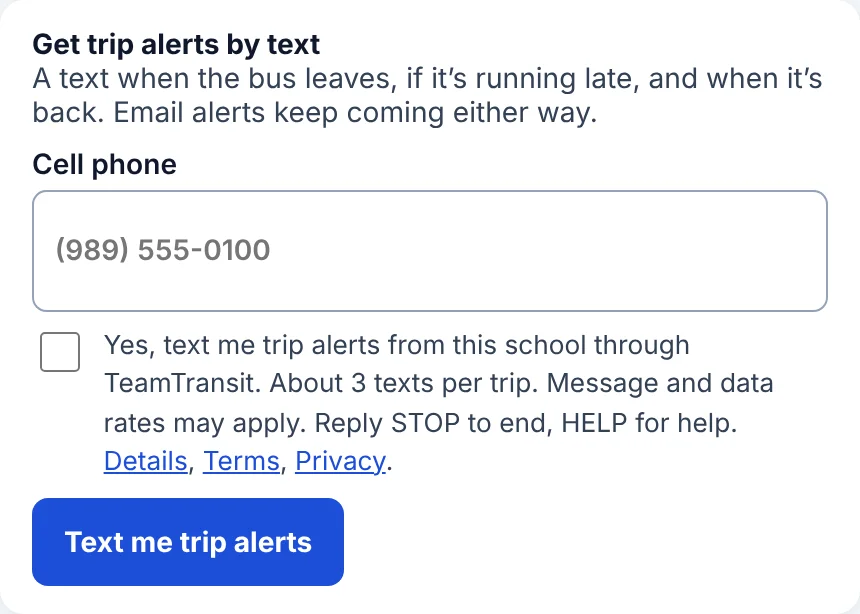
We record the number, the date and time you agreed, and the device’s internet address, so the school and the carriers can see you asked.
What you’ll get
Only alerts about trips your athlete is on. No marketing. Examples:
How often
About 3 texts per trip: one when the bus leaves, one if it’s late, one when it’s back. How many you get in a month depends on how many trips your athlete takes. A parent with two athletes on the same bus gets one text.
Cost
TeamTransit never charges parents. Your school pays for the texts. Message and data rates from your mobile carrier may apply.
How to stop or get help
- Reply STOP to any text to stop all trip alert texts. You’ll get one text confirming it.
- Reply START to turn them back on.
- Reply HELP, or email admin@teamtransit.app, for help.
- You can also press Stop texts on your trip page.
Trip emails keep coming either way. Carriers are not liable for delayed or undelivered messages.
Your privacy
Your mobile number is used only to send your school’s trip alerts. We do not share or sell mobile numbers or text consent to anyone for marketing, and we do not share them with third parties or affiliates except the carrier service that delivers the texts. See our Privacy policy and Terms.